A punch clock, a spreadsheet, a printed schedule and a group chat — four systems that never agree with each other, and a payroll run that starts by reconciling them. Shiftin One keeps the hours in one place from the moment someone walks in, and the schedule, the timesheet, the tips and the pay run all read from that same record.
One tap in the app. Add a geofence and the punch only counts inside the workplace — no clocking in from the parking lot at home.
Set the geofence radius per store or site
Optional selfie saved with the punch
Clocking out is never blocked — the manager gets a flag instead
02
An NFC card at the door
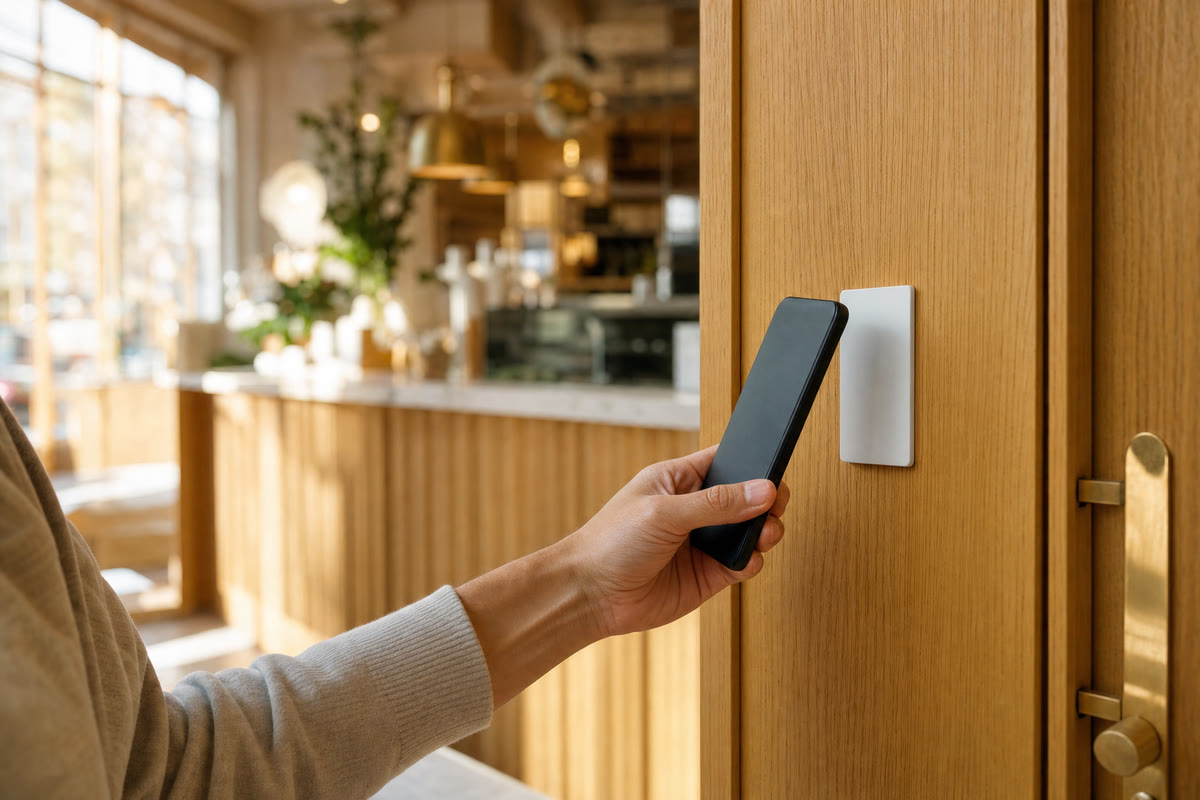
Hold a phone against the card and the punch is recorded — even with the app closed. Nothing to set up per person, and it works indoors where GPS wanders.
One card serves the whole team
Works on iPhone and Android
Card carries the store's location — no photo needed
03
A shared tablet
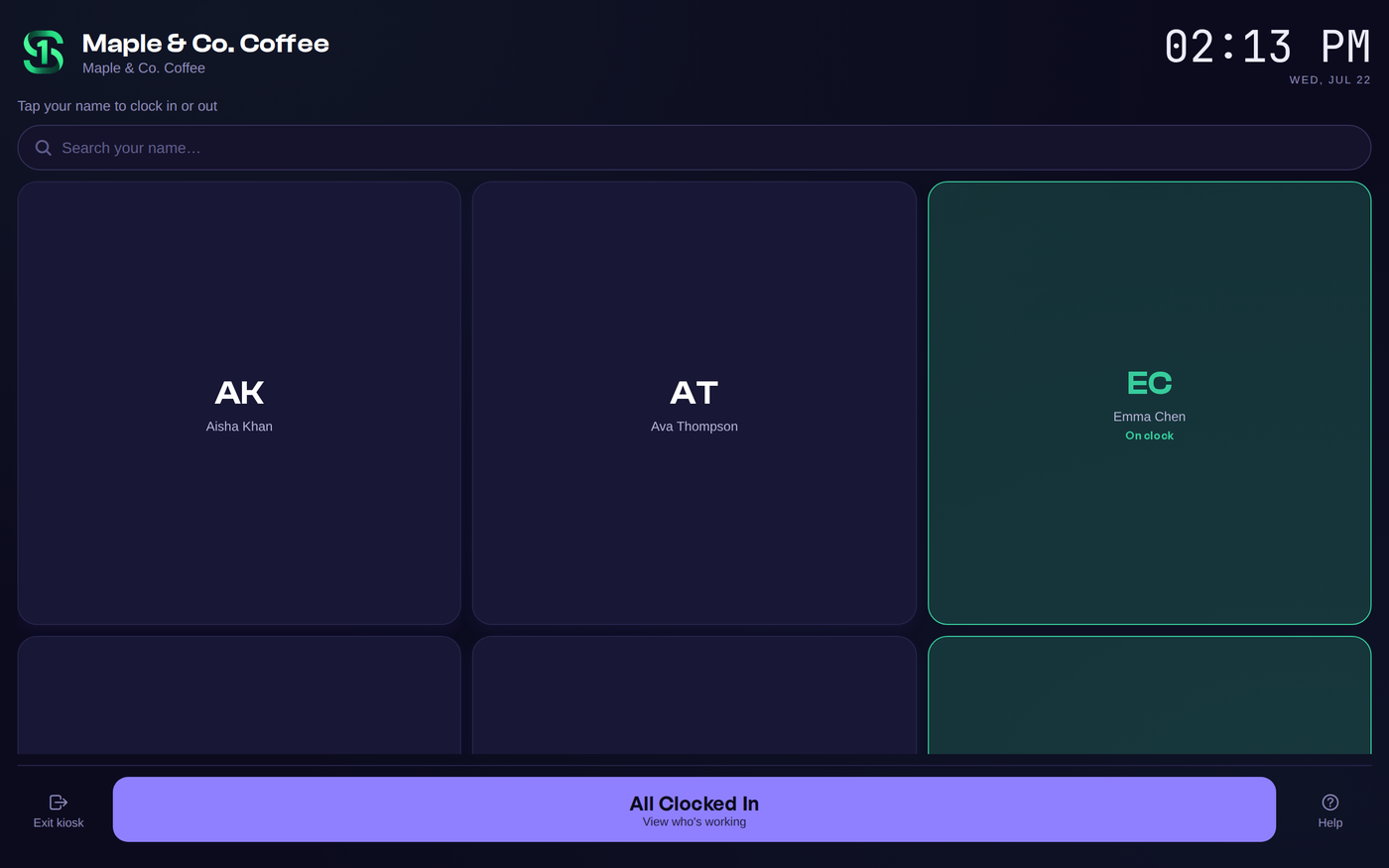
Bind a tablet once and it locks into kiosk mode. Staff punch with their own PIN, so nobody needs a phone at all.
Per-employee PIN — fast at a busy counter
Private mode hides the roster
Breaks and tips entered right there
Tap to clock in
A card by the door,and the shift starts.
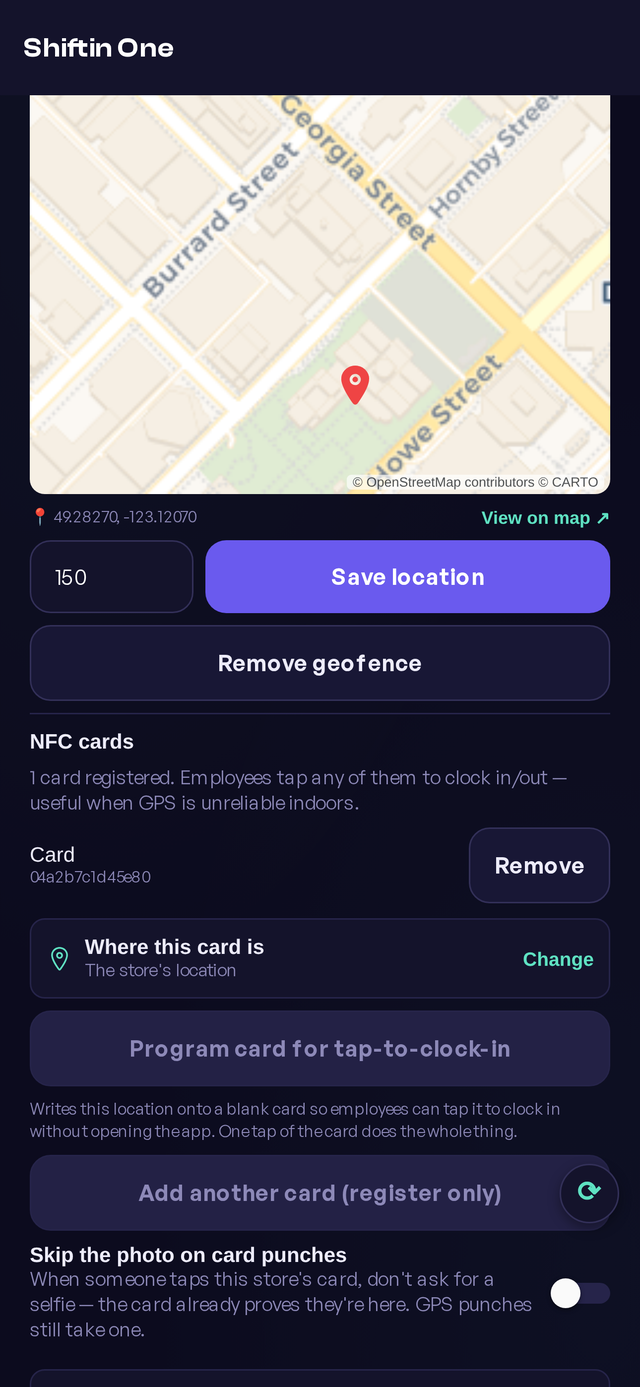
Program a blank NFC card once with the store's location. From then on anyone on the team holds their phone against it and the punch is recorded — the app doesn't even have to be open. It's the fastest way in and out of a shift we've built, and the one that survives a basement kitchen with no GPS.
Register once, works for everyone. No per-person setup, no cards to hand out — although you can register more than one card per store.
The punch lands with the app closed. One tap of the card does the whole thing.
Skip the selfie, on purpose. The card already proves they're standing at the store, so photos can be turned off for card punches and kept for GPS ones.
Tap out and the tips are already split. The end-of-shift tip distribution comes up on the way out the door.
Cards are ordinary blank NFC tags — a sticker for the counter or a card for the wall. Print your own sheet from the app, or have us post you a set.
Order cards
We'll put themin the post.
Any blank NFC tag works and you can buy them anywhere — but if you would rather not go looking, we will mail you ours, printed and ready. They arrive blank: hold one to your phone once, inside the app, and it carries that store from then on.
$25.99CAD for the first card, anywhere in Canada — shipping free. Plus tax.
+$7.99for each extra card in the same envelope — front door, back door, a spare.
A sheet comes with them. One page in the envelope: what the card is, the five setup steps a manager does once, and the three a person does every shift.
About a minute to set up. Open your store's Clock-in & kiosk page, hold the card to your phone, done.
One card, the whole team. Nothing to hand out and nothing to set up per person.
Paid — thank you. Your cards go in the post within two business days, and you will
get an email with the tracking number when they do. They arrive blank, with a sheet
showing the one-minute setup.
Canada only for now. Sales tax is added at checkout, once Stripe knows which province it is going to — GST or HST everywhere, plus PST in British Columbia. Paid through Stripe; we never see your card number.
Shared tablet
One tablet on thecounter. That's it.
Bind an old iPad or Android tablet to a store once and it stays in kiosk mode. Staff tap their name, enter their PIN, and they're on shift — no phones, no app installs, no passwords for people who just want to start work.
Locked to one store. The device is bound to the location, so a kiosk can't punch someone in somewhere else.
Private mode. Where who's on shift is confidential, the roster is hidden and people type their name instead of picking it off a wall.
A selfie on every punch, if you want one. The front camera captures who actually punched — not who borrowed a PIN.
Breaks and tips at the counter. Start a break, end it, declare tips — all from the same screen.
Photos, breaks and tip entry are settings per location, and every one of them is optional.
All of it, in one place
Shiftin One
Time clock
Phone punch
NFC card
Tablet kiosk
Geofence
Selfie proof
Scheduling
Build the week
Publish & notify
Swaps & pickups
Time off
Availability
The team
Who's on now
Per-store chat
Certifications
Roles & access
Notifications
Payroll
Timesheets
Overtime & stat pay
CPP / CPP2 / EI
Paystubs
T4 · ROE · RL-1
The money
Tips & tip-out
Labour cost
Direct deposit
QuickBooks CSV
Reports
Real Canadian payroll
It already knows therules in your province.
Vacation pay at 4%, or 6% after five years. Daily and weekly overtime. Statutory holiday premiums. CPP, CPP2 and EI — QPP and QPIP in Québec. Every one of them computed for the province the store is in, from the hours the punch clock already recorded.
Year-end that finishes itself. T4 and T4 Summary, RL-1 for Québec, and a Record of Employment when someone leaves.
Pay them directly. Generate a CPA Standard 005 file and hand it to your bank — or export a QuickBooks-ready CSV for your accountant.
Tips handled honestly. Pooled or individual, net of tip-out, on the stub and in the tax calculation.
Watched, not assumed. The tax tables live in the system and are checked against the CRA's published figures — including the mid-year changes most tools miss.
T4T4 SummaryRL-1ROERemittancePaystubs & YTDGarnishmentsCPA-005 direct deposit
Jordan L.Semi-monthly · Aug 1 – Aug 15
Regular · 76.0 h$1,330.00
Overtime · 4.5 h × 1.5$118.13
Stat-holiday premium$96.20
Vacation pay · 4%$61.78
Tips · net of tip-out$214.00
CPP−$58.10
EI−$28.40
Federal & provincial tax−$201.34
Net pay$1,532.27
Year-to-date on the stub · QuickBooks CSV and a CPA-005 bank file in one click.
13 jurisdictions
Every province and territory, each with its own tables, thresholds and holiday rules — not one rulebook applied to all of them.
From the punch, not a re-key
The hours on the stub are the hours from the door. Nothing is typed twice, so nothing drifts between the timesheet and the pay run.
The accountant becomes optional
Shiftin One does the calculation and produces the filings. Your money never passes through us — you pay your team, from your own bank.
Everything a shift-basedbusiness actually needs.
Clock in & out
One tap from a phone, a card or the tablet.
Geofenced punches
The punch only counts inside the store's radius.
Selfie proof
A front-camera photo saved with the punch, per location and optional.
Breaks
Start and end breaks, paid or unpaid, on whatever your province requires.
Never blocked out
Clocking out always works; anything odd becomes a flag for the manager.
Forgotten clock-outs
Shifts left open are caught and raised instead of silently running all night.
Corrections with a trail
Edits are recorded — who changed what, when, and what it was before.
Timesheets
Hours per pay period, ready to approve.
Approvals
Time off, swaps, expense claims and corrections all land in one queue.
NFC tap-to-clock-in
Hold a phone to the card — the punch lands with the app closed.
Program your own cards
Write the store's location onto any blank NFC tag from the app.
More than one card
Register a card for the front door and another for the back.
Photo-free card punches
The card proves the location, so the selfie can be skipped for taps.
Tablet kiosk mode
Bind a device once; it stays locked to that store.
PIN-first mode
People type a PIN rather than picking a name off a public list.
Private roster
Hide who's on shift where that's confidential.
Tip entry at the counter
Declare tips on the way out, on the same screen.
Printable card sheets
Stickers and carrier cards you can print and stick by the door.
Build the week
Drag shifts onto the grid; copy last week when it's the same.
Publish & notify
Your team is told the second the schedule goes out.
Open shifts
Post a shift and let the team claim it.
Swaps & drops
Handled between staff, approved by a manager.
Availability
People say when they can work before you build the week.
Time-off requests
Requested, approved and reflected on the schedule.
Multiple locations
Schedule across stores, each with its own roster.
Time zones
Shifts are stored against the store's zone, so DST doesn't move them.
Republish safely
Change a published week and only the affected people are notified.
Pay periods
Weekly, bi-weekly, semi-monthly or monthly — your cycle, annualised correctly.
Provincial rules
Vacation pay, overtime and stat holidays per province.
CPP / CPP2 / EI
Statutory deductions to current CRA figures, QPP and QPIP in Québec.
Overtime & premiums
Daily and weekly thresholds, stat-holiday premium pay.
Tips on the stub
Pooled or individual, net of tip-out, taxed properly.
Paystubs & YTD
A stub your team can read, with year-to-date on it.
T4, T4 Summary, RL-1
Year-end slips produced from the same records.
Records of Employment
An ROE when someone leaves, without rebuilding their history.
Direct deposit
A CPA Standard 005 file for your bank — the money never touches us.
Garnishments
Court-ordered deductions applied in the right order.
Remittance
What's owed, to whom, and when.
QuickBooks CSV
One click, accountant-friendly, no copy-paste.
Who's on right now
Live status across every store on one screen.
Labour cost
What this shift is costing while it's still running.
Hours by period
Compare this pay period with the last one.
Attendance
Lates, no-shows and early outs, without a paper trail.
Per-store chat
Shift news where the schedule and the punches already are.
Certification alerts
A warning before someone's certificate lapses mid-shift.
Roles & permissions
Owners, admins, managers and staff each see their own slice.
Push notifications
Schedules, approvals and exceptions, on iPhone and Android.
Audit log
A full record of who did what, when.
Start today, and thefirst pay run is already easier.
3 ways
to clock in — their own phone, an NFC card at the door, or a shared tablet. Mix them however each store wants.
13 regions
every province and territory, each with its own payroll rules, tables and holidays built in.
$0.99 a seat
per extra employee, per month — on top of $18 for your first store, which already includes ten.
Get Shiftin One on your phone
iPhone, iPad and Android — the same account, the same hours.
Built by people whoran the shift.
Shiftin One started inside a working restaurant, because nothing on the market got Canadian payroll right without an accountant on retainer. Every rule in it exists because a real pay run needed it.
Minutesto set up your first store
No contractcancel whenever you like
Your dataexportable, always
Honest pricing
One simple bill.No setup fee, no contract.
Your first store
$18CAD / month
Everything included — ten employee seats, the tablet kiosk, NFC cards, scheduling, tips, chat, reports and full Canadian payroll.
14-day free trial, no credit card. Pay annually and save 10%.
Each additional store — its own schedule, kiosk and manager, on the same bill.
$0.99 / mo
Each employee seat beyond the ten your first store includes.
Save 10%
Pay for the year instead of the month.
Estimate your monthly bill
Slide to size your team. The first store includes ten seats.
Estimated · monthly
$18
?
Know everything you want to know
Frequently asked questions
What is Shiftin One?
Shiftin One runs the everyday work of a shift-based business in Canada: scheduling, clocking in, timesheets, tips and payroll — all in one place and all from the same set of hours. It's built for cafés, restaurants, retail, clinics, salons and job sites, from a single location to a dozen.
How does the NFC card work?
You program a blank NFC card or sticker once from the app; it carries the store's location. After that, anyone on the team holds their phone against it and the punch is recorded — even with the app closed. One card serves everyone, there's nothing to set up per person, and it works indoors where GPS is unreliable. It works on both iPhone and Android.
Do my staff need their own phones?
No. A shared tablet in kiosk mode covers a whole store — staff punch with their own PIN and never need to install anything. Phones, NFC cards and the kiosk can all be used at the same store, in whatever mix suits you.
Is it on the App Store and Google Play?
Yes — Shiftin One is on the App Store for iPhone and iPad, and on Google Play for Android, and it runs in the browser as well. It's the same account and the same data everywhere; managers tend to use the web, staff their phones, and the counter its tablet.
Do I need a credit card to start?
No. The 14-day free trial needs no credit card — you only add one when you're ready to keep using Shiftin One after the trial.
What does a second store cost?
Each additional store is $12 CAD a month on the same account and the same bill. Every store gets its own schedule, kiosk and manager. Employee seats beyond the ten included with your first store are $0.99 a month each.
Does it handle Canadian vacation pay and overtime?
Yes. Provincial defaults are built in — vacation pay at 4%, or 6% after five years, daily and weekly overtime, statutory holiday premiums, and CPP / CPP2 / EI, with QPP and QPIP in Québec. Rules can be adjusted per store for your province and your setup.
Can it produce T4s and Records of Employment?
Yes — T4 and T4 Summary, RL-1 for Québec, and a Record of Employment when someone leaves, all built from the same records that produced the paystubs. You can also generate a CPA Standard 005 file to pay your team straight from your own bank, or export a QuickBooks-ready CSV for your accountant.
Can I cancel? What happens to my data?
Yes — there's no contract, cancel anytime. If you cancel we keep your data for 30 days so you can export everything, payroll records included, before it's removed.
Where is my data stored?
Hosted in Canada (OVHcloud, Quebec) and operated with PIPEDA-aligned practices — nightly encrypted backups, a biometric app lock, and a full activity log of who did what. You can export your full payroll records at any time.
Get started with Shiftin One
Set up your first store in minutes — kiosk, NFC cards, the schedule, tips and Canadian payroll, all in one place.